
Read the last drawing. Make the next one.
SandurTech RevE reads heat-exchanger and pressure-vessel fabrication drawings into checked, structured data, then produces new drawings from approved ones. It runs as a desktop app on an ordinary shop laptop, Mac or Windows, and can be taught other kinds of equipment.
Explore the RevE demoMost new orders are close cousins of an old one. The engineering already exists on paper. It is just locked in a format designed for human eyes.
01 · The operating reality
Every enquiry starts with redrawing something you already drew.
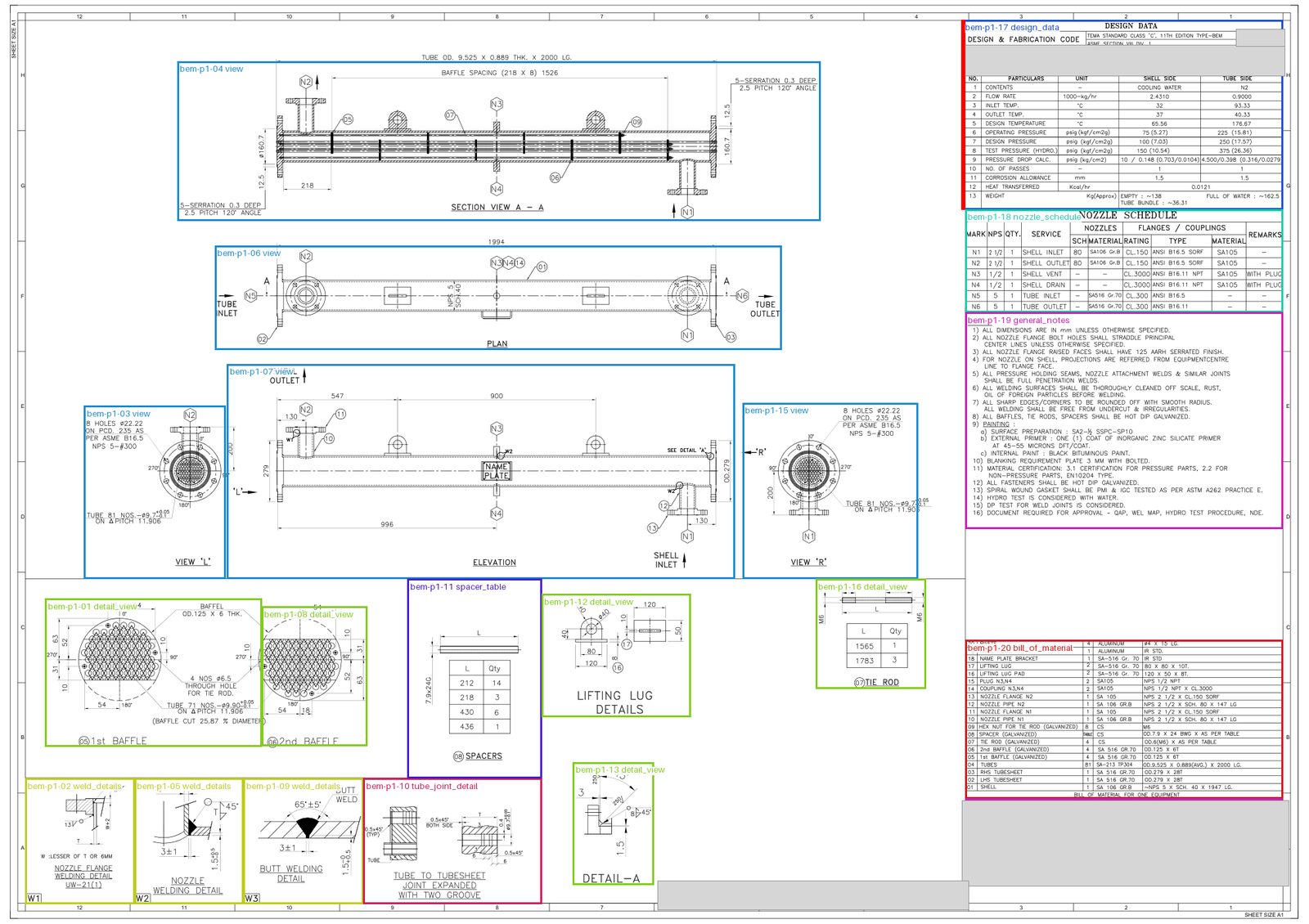
A shell-and-tube exchanger drawing carries the general arrangement, sections, a design-data table, a nozzle schedule, a parts list of 40 to 100 rows, notes and a title block. A new order usually changes a handful of values.
Scarce drafting time
Each close cousin of an old exchanger is redrawn in CAD by a skilled draughtsperson, with an expensive licence, while enquiries wait.
Text that isn't text
In our first five drawings, three had no text layer at all. Every letter was exported as drawn curves, and one sheet was stored rotated by 90°.
Manual take-off errors
Copying a parts list or design data by hand invites unit conversions, rounding and values borrowed from a neighbouring drawing.
02 · How RevE thinks
Let the AI look. Let the code decide.
Before writing a single AI call, every step of the job was given one verdict: code, AI, or both. Of about thirty steps, only three kinds of work need a model.
- AI perception (3 kinds)
- AI proposes, code verifies
- Plain code: rotation, snapping, arithmetic, checks, files
Arithmetic never goes to the model
A U-tube table of 13 bend radii must add up to the 262 tubes in the parts list, and every developed length must equal two straight lengths plus π times the radius. Code checks it.
Every value must exist on the sheet
Values are copied exactly as printed, with their printed units. If a value cannot be found on the drawing, it is rejected.
The model guesses, the code snaps
AI marks rough regions; code snaps each edge to the border line actually drawn on the sheet. The model only ever chooses between real lines.
03 · Trust
One read is a rumour. Two reads are evidence.
A single AI read of a parts list got one field wrong in every 870, confidently and in a perfectly clean format. Accuracy alone does not tell an engineer which value to doubt.
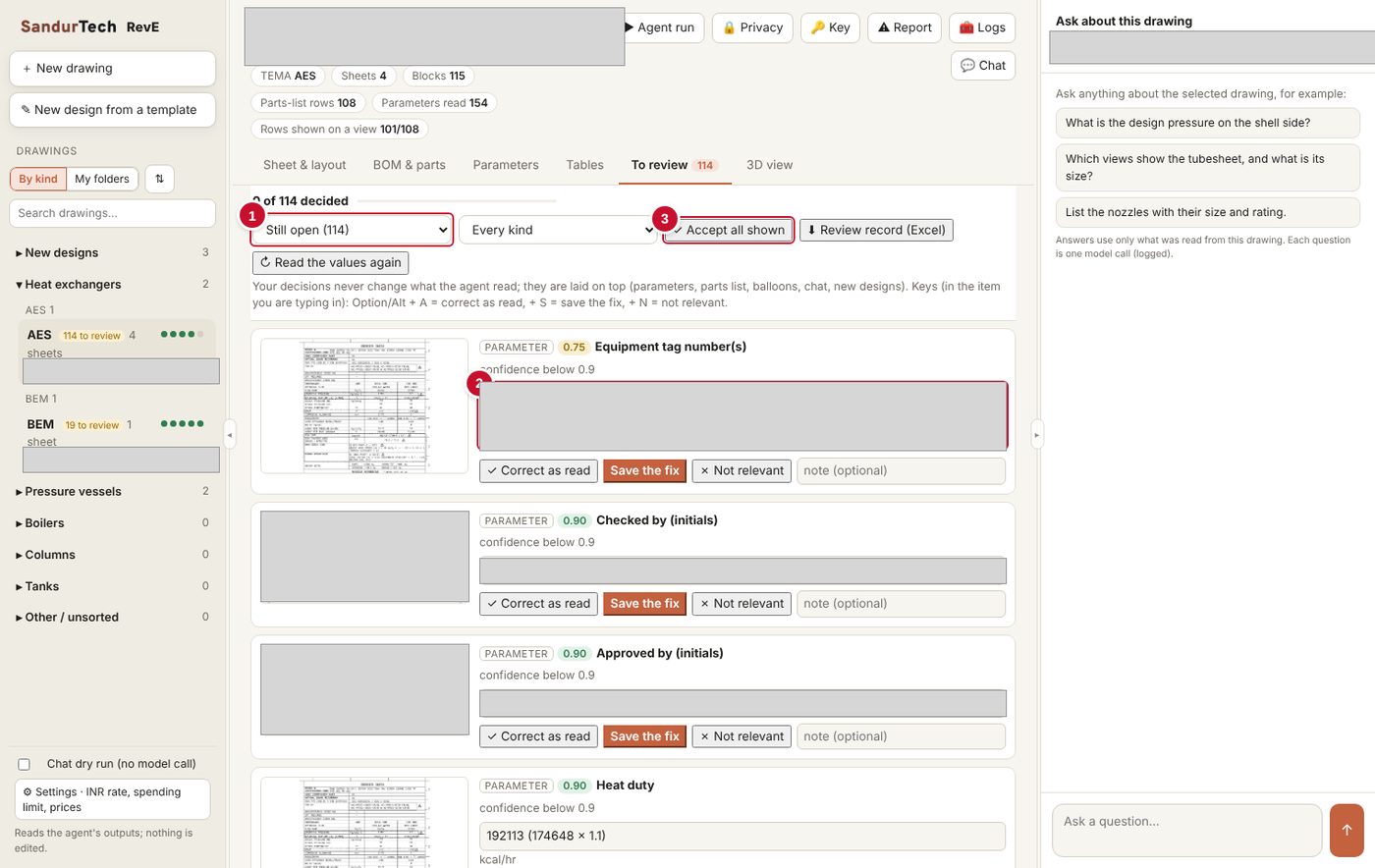
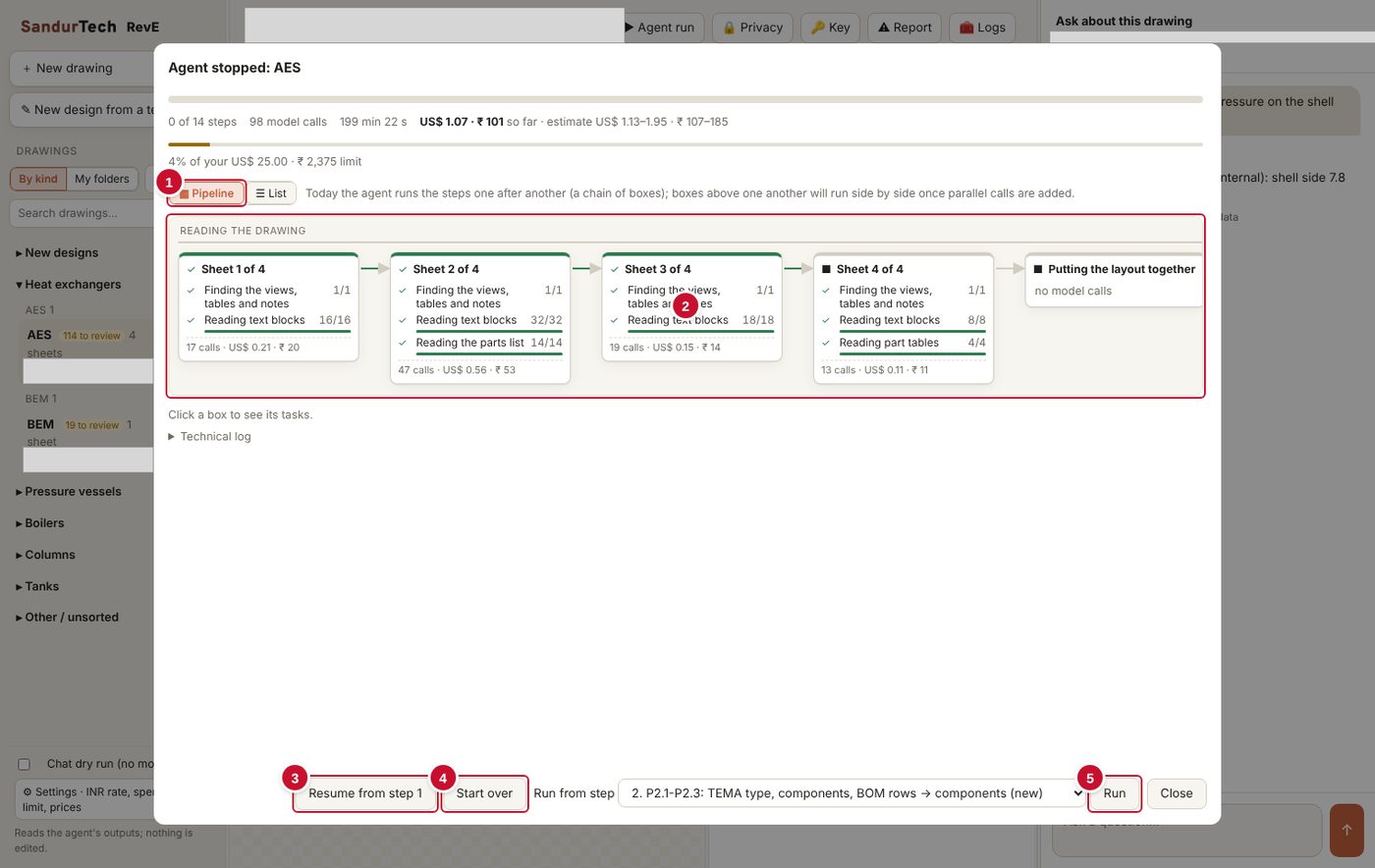
RevE reads every parts list twice, independently, at a different resolution and with different row groupings. Code compares the two field by field. Agreement earns confidence. Disagreement goes to a person, with a picture of the exact spot on the sheet.
Confidence is earned
A value read from a picture is never marked fully certain. Agreement between reads raises confidence; the model's opinion of itself never does.
Decisions are a layer
A reviewer's decision never overwrites what was read. If the drawing is read again and a value changes, the decision reopens.
A drawing that agrees with itself
RevE checks that every place on the sheet states the same tube count, pattern and pitch, and finds typos and wording slips. The original is never changed.
A record for quality
The full review record exports to Excel: who decided what, and when. On a large drawing, settling every doubtful item takes about half an hour.
04 · New drawings from templates
The next drawing, without drawing it.
A new design starts from a drawing that has already been read and reviewed. RevE edits that PDF in place, in the drawing's own lettering, with no AI call anywhere in the flow.
Pick a template
Start from an approved drawing of the same exchanger type.
Change what differs
A step-by-step wizard: title block, design data, shell, bundle with tube pattern (30°, 60°, 90°, 45°), nozzles, spacing.
Edit in place
Only the changed characters are replaced, using the template's own digit strokes.
Check what changed
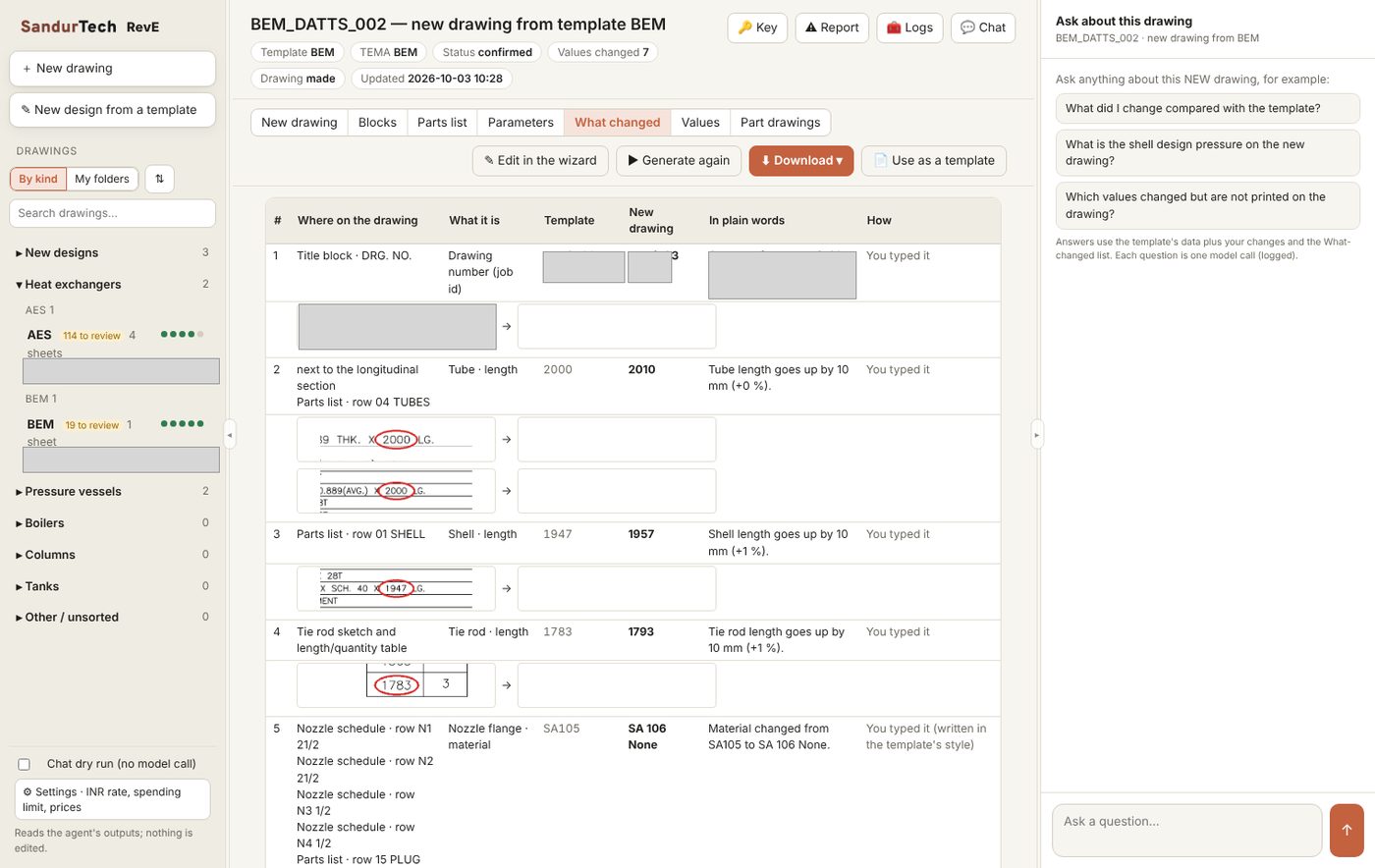
Plain-words list, before-and-after pictures, a blue-marked review copy and Excel.
Rules for knock-on effects
Add tubes and the layout circle, shell size, baffles and tie rods may follow. Suggestions come from TEMA tables and fixed formulas, each naming its rule.
Readings derived, not re-read
RevE knows exactly what it changed, so the new drawing's parts list and parameters are derived for free, instantly and exactly.
A library that grows
Every new drawing can become a template. A shop's approved designs become the starting point for the next enquiry.
Part drawings and AutoCAD DXF
Each design also gets assembly, sub-assembly and part drawings, and a true-size DXF with layers, editable text and whole lines in the standard CENTER, HIDDEN and DOT line types.
Checked before you download
Before generating, RevE flags typos in what was typed and spelling still open on the template. After generating, an integrity check confirms every sheet states the same tube size, hole count, pitch and pattern.
05 · Confidentiality
The AI reads the engineering, not whose drawing it is.
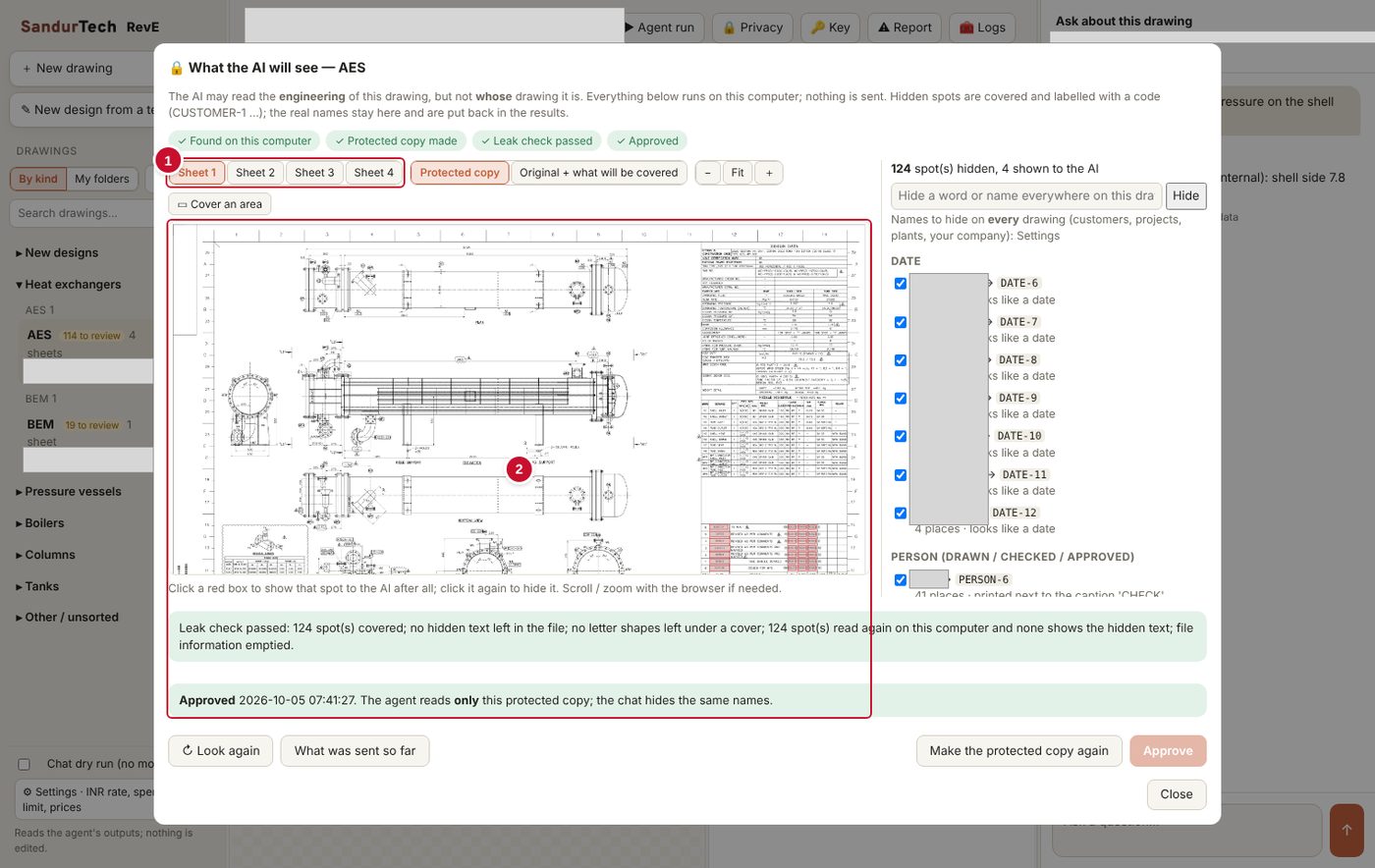
Before anything leaves the laptop, RevE finds customer names, projects, plants, people, dates and document numbers. It removes the letters underneath, not just covers them, and replaces each with a code such as CUSTOMER-1.
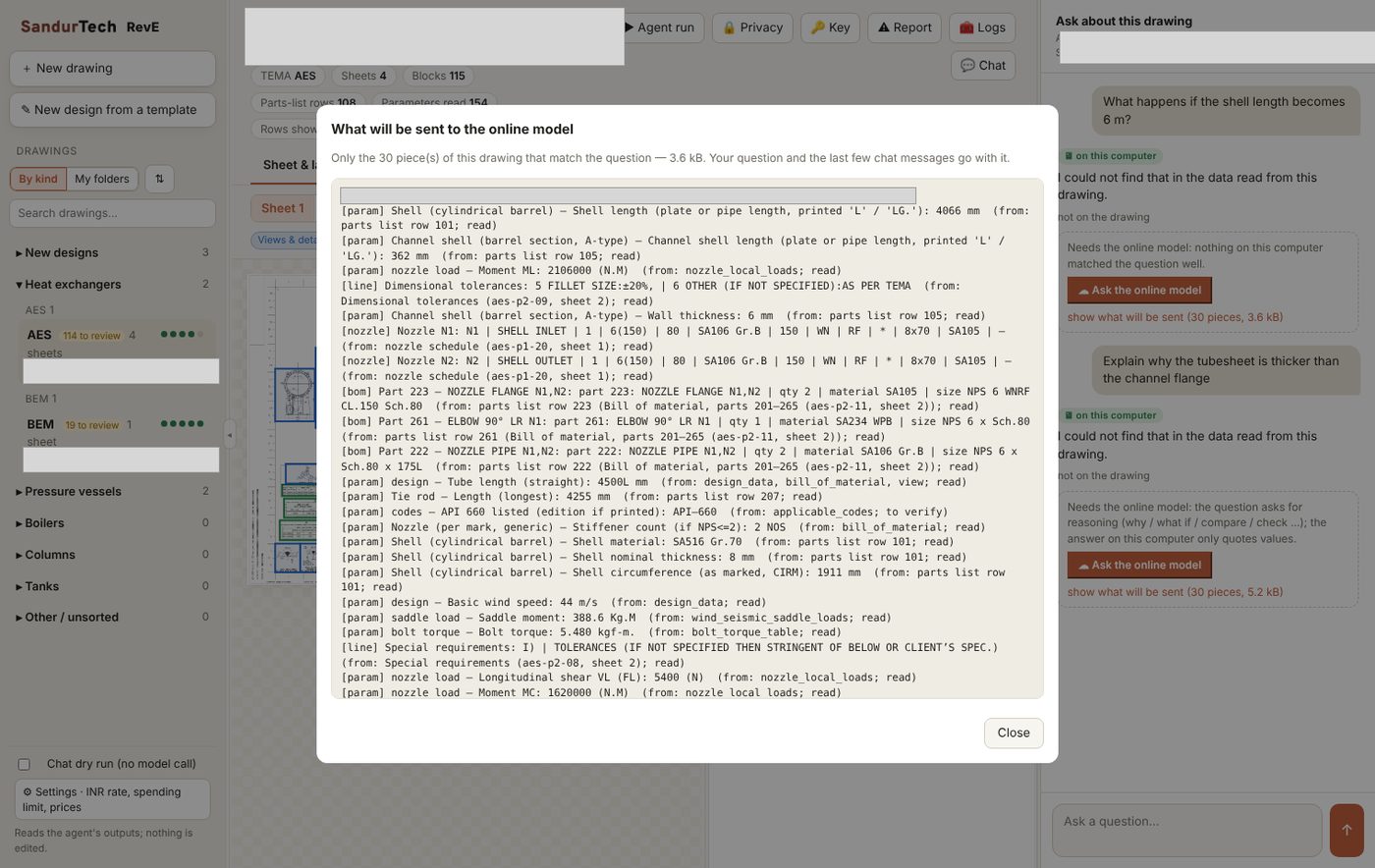
A leak check confirms nothing is legible or hidden in the file, and a person approves the protected copy. Every request swaps names for codes; replies are restored on the laptop.
Simple chat questions are answered on the laptop itself in about a millisecond. Only reasoning questions go online, after the user sees exactly what will be sent.
06 · Built for the shop floor
Designed for the laptop the shop actually owns.
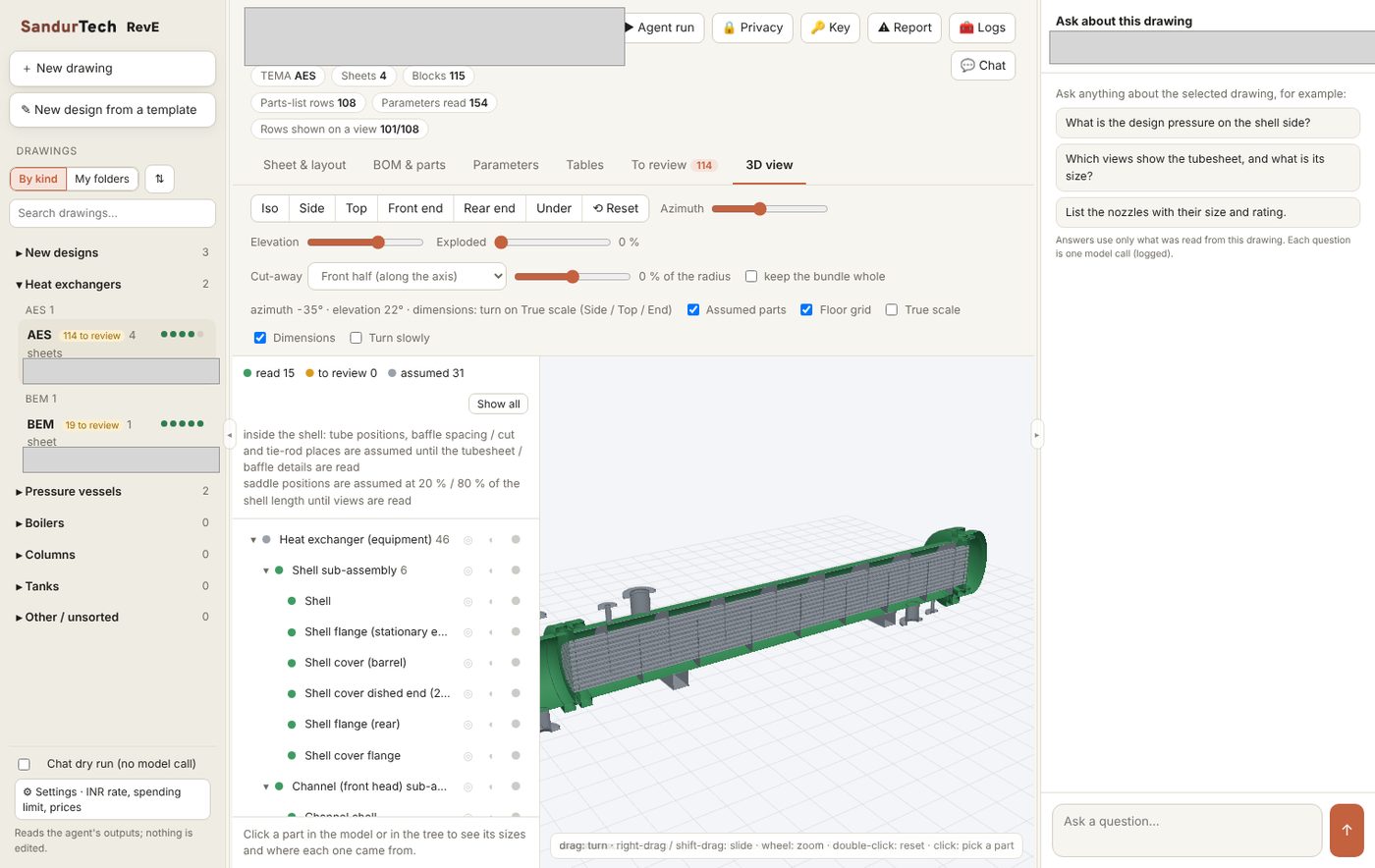
RevE was specified against a shared Windows laptop with 4 to 8 GB of memory, used by several people in a fabrication office. It installs on Windows and Mac from one zip, with no cloud account.
Light on memory
Peak memory fell from over 6 GB to about 0.3 GB by rendering only the piece of the sheet each step needs.
A desktop app
Local log-in, a record of who did what, and export packages with a checksum on every file. No cloud subscription holding customer drawings.
Plain words
Screens say "To review", "What changed" and "What the AI will see". Costs appear in dollars and rupees.
07 · Measured results
Numbers from the build log.
Measured on five real TEMA fabrication drawings (AES, AEW, BEM, BES, BEU) against human-reviewed references.
Parts-list fields correct after review
AI cost to read a full drawing, down 54% by choosing a model per task
AI calls to make a new drawing from a template
Of the drawing's ink present in the AutoCAD DXF export
08 · From calculation to drawing
Start the new drawing from the design calculation.
Many jobs begin with a pressure-vessel calculation report rather than a drawing. In the new-design wizard, RevE reads a PV Elite report on the laptop, checks that its exchanger type matches the template, and fills only what the report really says, tagging each value with its page. Every gap is labelled honestly instead of guessed.
On a public sample report, a one-line check found the outer tube limit (17.01 in) larger than the shell's inside diameter (17.000 in). The report contradicted itself.
09 · Beyond exchangers and vessels
Whole folders, messy drawings, new kinds of equipment.
Real archives are not tidy. RevE plans a whole folder at once, copes with the drawings shops actually keep, and can be taught the equipment a shop builds next.
A folder at a time
Point RevE at a folder: it looks at every PDF for free, guesses each family, estimates the cost and lets you set a budget before anything is read.
Drawings as they are
Crossed-out details are left out of the reading, repeated sheet sets are read once, and Hindi text in old fonts is converted, with confidential names hidden in both scripts.
Spelling on the sheet
Misspelt words printed on a template are found on the laptop. A correction, once accepted, is made in every new drawing from that template.
Teaching RevE a new assembly
Boilers, columns, tanks or a shop's own equipment are read at layout level from day one: sheets, blocks, parts list, text, tables and balloons, with privacy, spelling, review and chat. A full template follows in a short, guided project, the same way the pressure-vessel template was built from the heat-exchanger one.
Share samples
Three to five typical drawings of the assembly, in different sizes, and calculation reports where they exist.
Agree the catalogue
Common parameters carry over; your engineers add the assembly's own components and values, reviewed as a spreadsheet.
Read and review
The agent reads the samples; your team's review decisions correct and complete the template.
Add the rules
Shop practice and the governing code, for example API 650 for tanks, become the wizard's steps and knock-on checks.
See RevE on your drawings.
We are working with fabrication units on heat exchangers and pressure vessels. Bring one approved drawing and one recent enquiry, and we will show you the read, the review and the new drawing. A user manual and short how-to videos come with every installation.